Experience Building a Platform for Native C++ Applications on Android/iOS, Windows/macOS, and Web
Author: Kim Bondarenko
Form: Presentation
For more than 20 years, we have been developing software for desktop and mobile devices in the fields of digital video and networking technologies. Together, these areas cover a significant part of our practical work: OTT services, video and audio calls, and remote access technologies.
In this talk, however, I would like to focus not on OTT itself, but on how the need to build similar services for a wide range of target devices and platforms led us to create a small platform that significantly simplifies this process.
The Problem
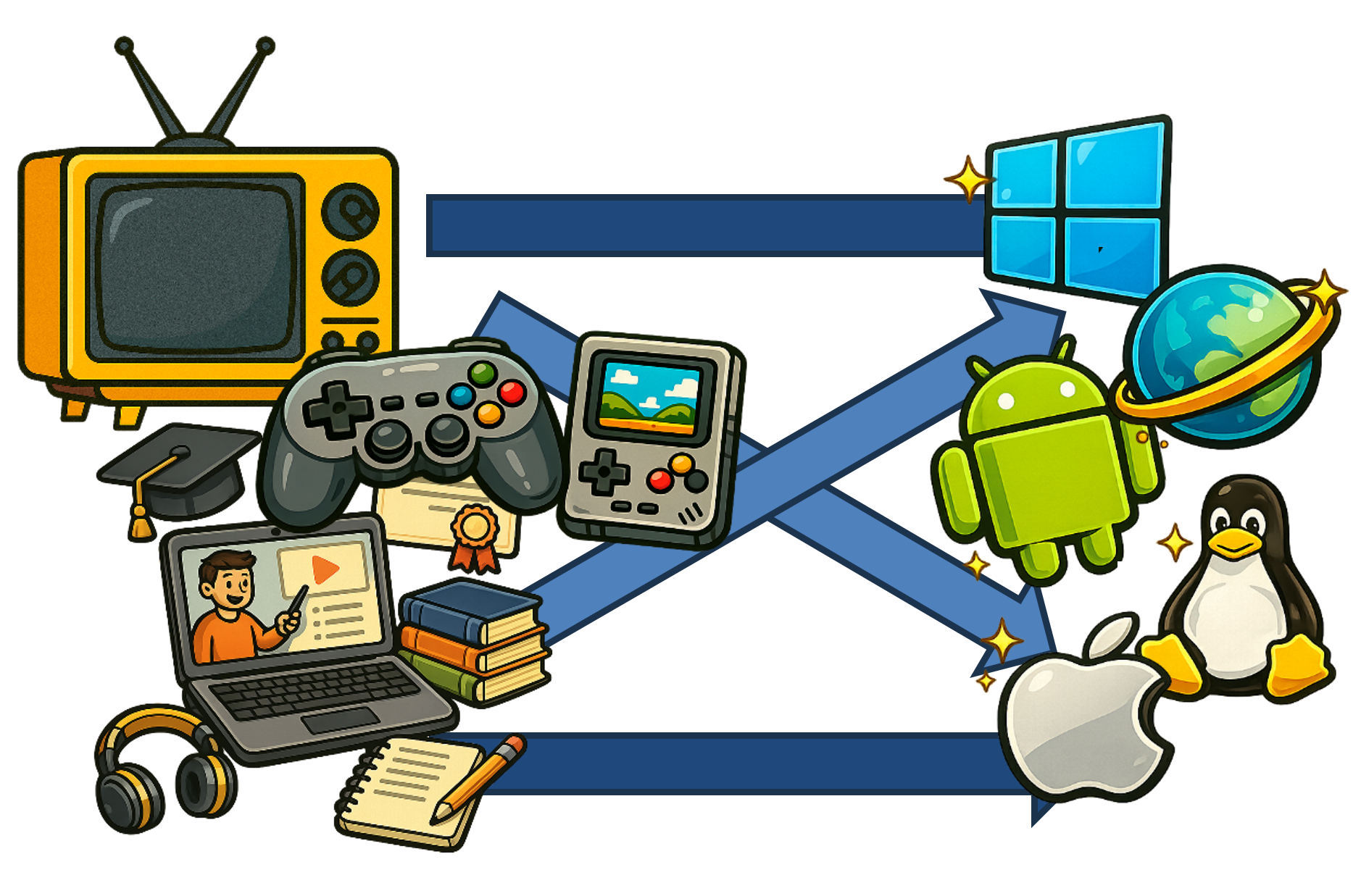
So, we found ourselves in a situation that is quite common for developers of modern services. This is especially true for companies that provide a kind of franchise model — helping other teams build services based on their own product.
Whether it is television or video, social games, educational courses, fitness apps, marketplaces, delivery, booking, loyalty programs, event services, transportation, and so on, every new product — whether our own or a franchise — means developing and releasing an application for a whole set of mobile and desktop platforms: Android and iOS, Web, Windows and macOS, and sometimes even Linux.
With a straightforward approach, the development effort becomes roughly the number of products multiplied by the number of platforms. That is a lot of work, and there is an obvious need for optimization.
Performance and Flexibility

You might ask: what's the problem? We can use thin WebView-based applications or app builders that take some custom format as input and generate either a web application or native code with wrappers around standard controls.
That works well until we need more performance or flexibility. Some data processing may have to happen on the client: computation or transcoding, relatively complex rendering, or preliminary analysis of incoming data.
In this case, a strictly universal solution is not enough. Otherwise, we end up with an approach where functionality in every direction is limited by the weakest platform. And we already have a champion of this approach — HTML + JavaScript.
So we have to move to a lower level — preferably without making development painfully complicated.
Why C++

I want to share our experience of using C++ on this challenging path. Why C++, you might ask?
- Ecosystem. C++ has a huge ecosystem across many domains. When we started, alternatives such as Rust simply did not exist. C++ is still extremely strong in areas such as game engines, while many mature and widely used libraries are written in C or C++.
- Experienced developers. Building complex applications still requires strong engineers. Strong engineers are often experienced engineers, and many of them come from the old-school C and C++ world.
- Performance. In performance-critical areas, C++ remains one of the strongest programming languages. This is not just about low-level optimizations, but also about the freedom it provides in areas such as multithreading and memory management.
What About Safety?

Newer languages often restrict some of the flexibility available in C++ in order to catch more errors at compile time and make dangerous operations harder to express. With C++, the responsibility remains largely with the developer.
In practice, this is manageable if the team follows established patterns, relies on mature libraries, and keeps low-level pointer manipulation out of application code. With these rules in place, memory overruns and deadlocks become rare even in fairly complex multithreaded systems.
How the Approach Evolved

We started with a collection of platform wrappers and our own STL-like utilities back when the standard ecosystem was much weaker. Some parts used Qt; later we built a CPU-rendered skin engine and our own multimedia components.
Web remained a separate world for a long time: Flash development had little in common with C++. The arrival of modern JavaScript, WebAssembly, WebGL and newer C++ standards finally made it realistic to bring the ecosystem together and reuse much more of the same code.
Requirements
We deliberately rejected a hard ban on native code: otherwise a large part of the existing C/C++ ecosystem would be unavailable. Low-level access is rare in application code, but it is essential when extending the framework itself.
We also did not want a rigid boundary between shared and platform-specific code. Sometimes the best solution is to use a native widget, storage API or networking primitive on one platform and fall back to a higher-level implementation elsewhere.
The same idea applies to GPU access: application developers may need anything from a high-level UI engine to 2D/3D rendering, compute shaders or direct platform-specific GPU capabilities.
Architecture
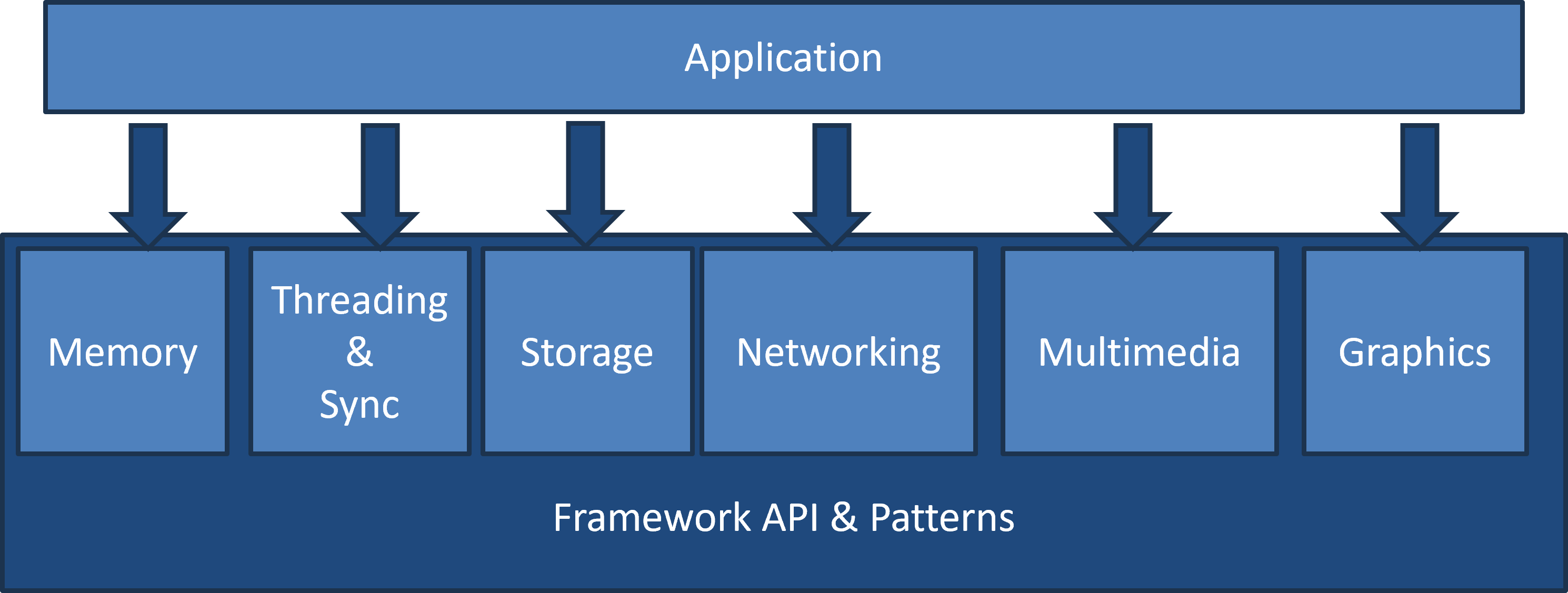
Instead of one rigid boundary between an application and the platform API, the framework is built in layers. Components can depend on one another, and an application can enter the stack at different levels depending on how much control it needs.
Memory
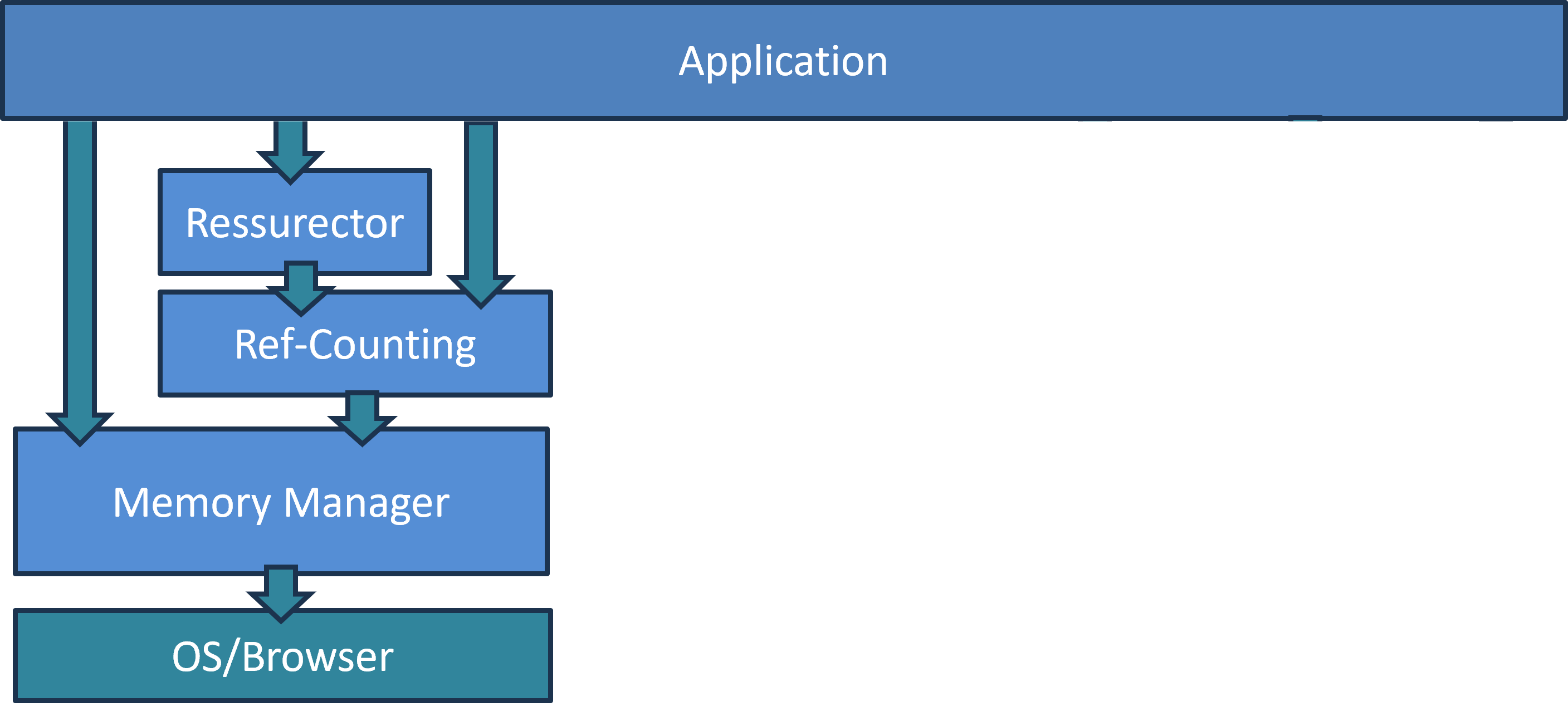
We chose reference counting for automatic lifetime management and built a Java-like style of working with smart objects around it. The reference counter remains visible when necessary, and the model supports interfaces and multiple inheritance.
For frequently allocated objects we added an optional O(1) memory manager. For even hotter paths, the Resurrector pattern returns an object to a reusable pool instead of destroying it completely.
At the application level, the rule is simple: use well-tested containers and framework abstractions, and avoid manual pointer arithmetic unless there is a very strong reason for it.
Graphics
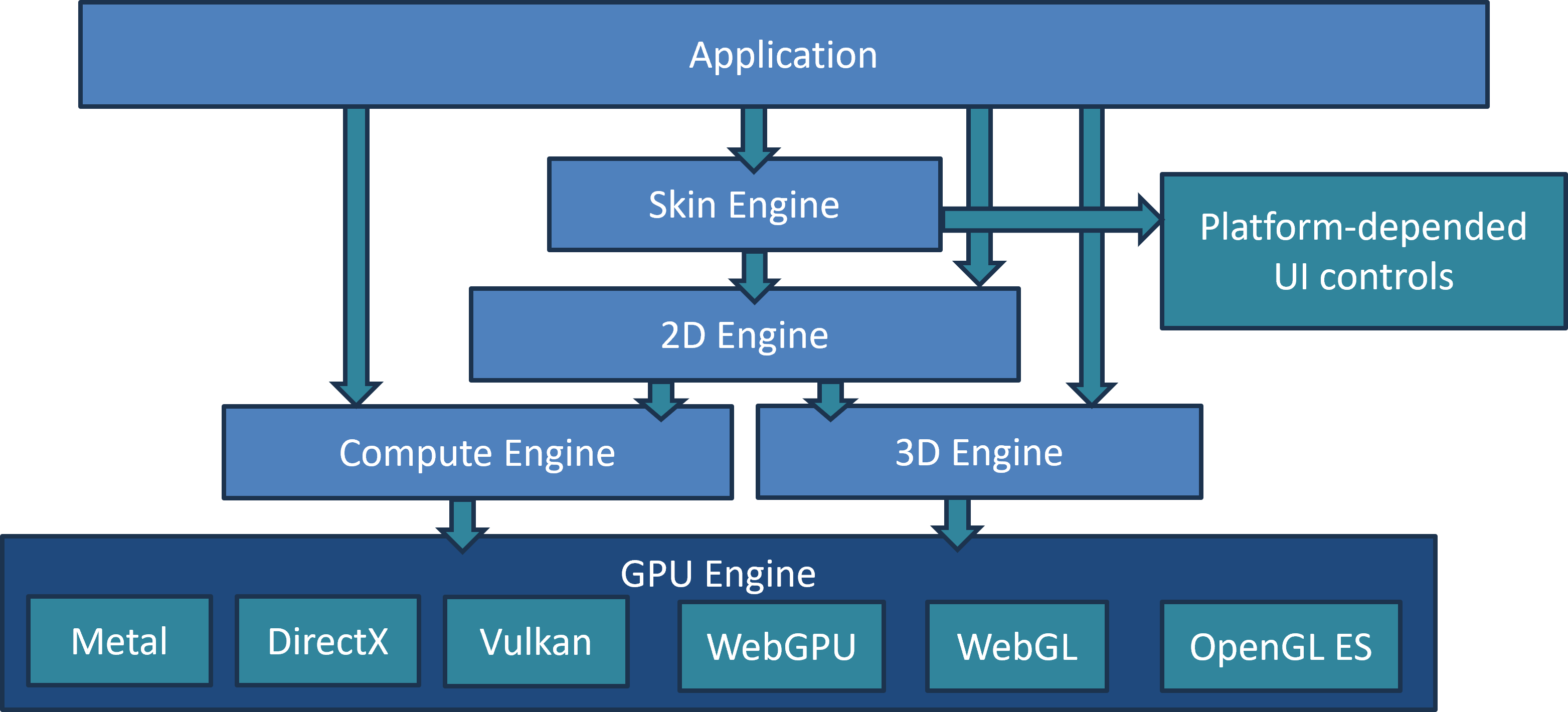
Applications normally use a relatively simple Skin Engine for buttons, layouts, images, lists, menus and animations. Native controls can still be embedded where deep system integration matters — for example edit boxes and virtual keyboards.
The rest is rendered through a platform-independent 2D engine backed by the GPU. The 2D layer itself uses lower-level 3D and compute engines, which in turn map to Metal, DirectX, Vulkan, WebGPU, OpenGL ES or WebGL.
When a platform lacks a feature such as compute shaders, the framework can use a slower fallback and notify the application so that it can trade a visual effect for performance if necessary.
Storage
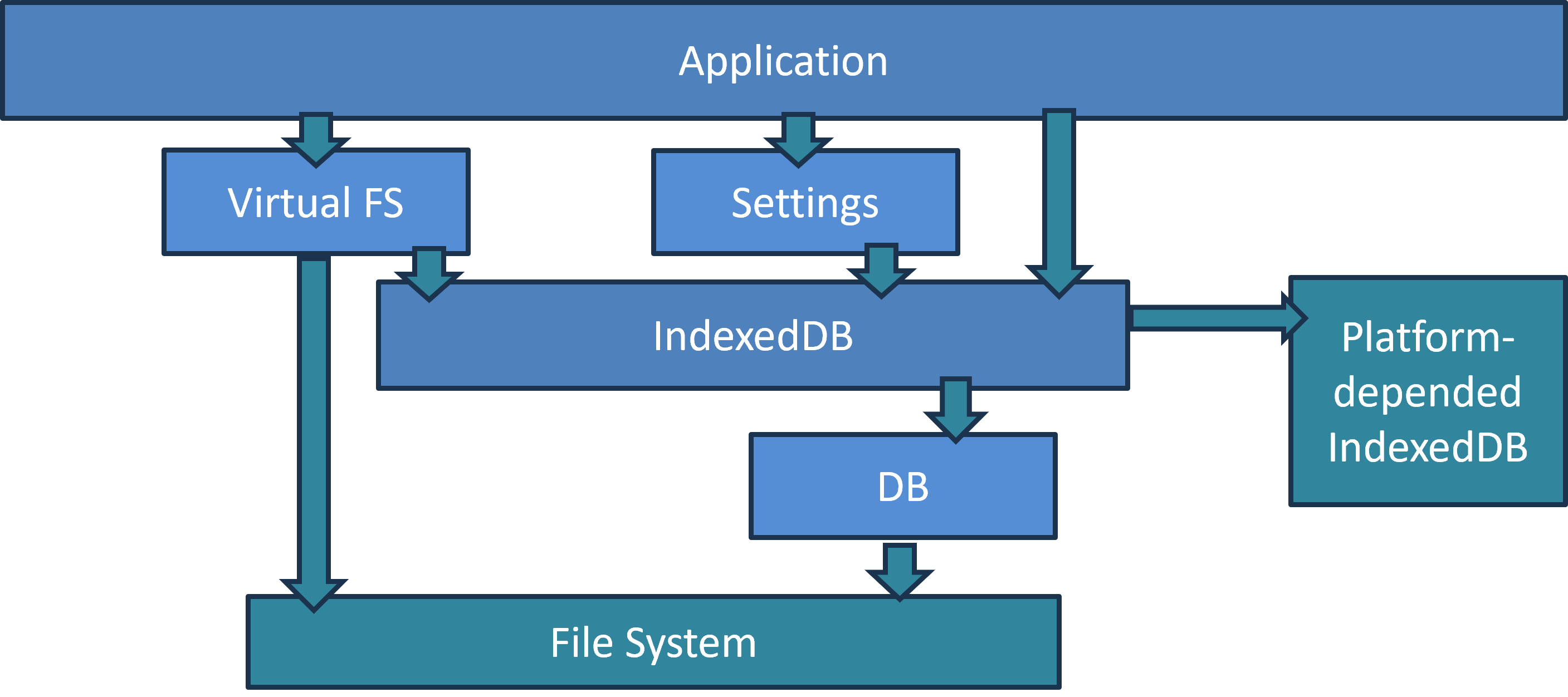
- Async storage for small files and caches
- Synchronous API for small settings
- Virtual FS for large files
- IndexedDB on Web, native file system elsewhere
File access on the Web is fundamentally different from native platforms. IndexedDB is asynchronous, while synchronous OPFS access is limited to worker contexts. Instead of hiding this completely, we designed the storage layer around these constraints.
Small files and caches use an asynchronous API. Small settings use a synchronous facade backed by data loaded into memory at application startup. Large files can use a Virtual FS that stores chunks in IndexedDB on Web and maps directly to files on native systems.
Networking
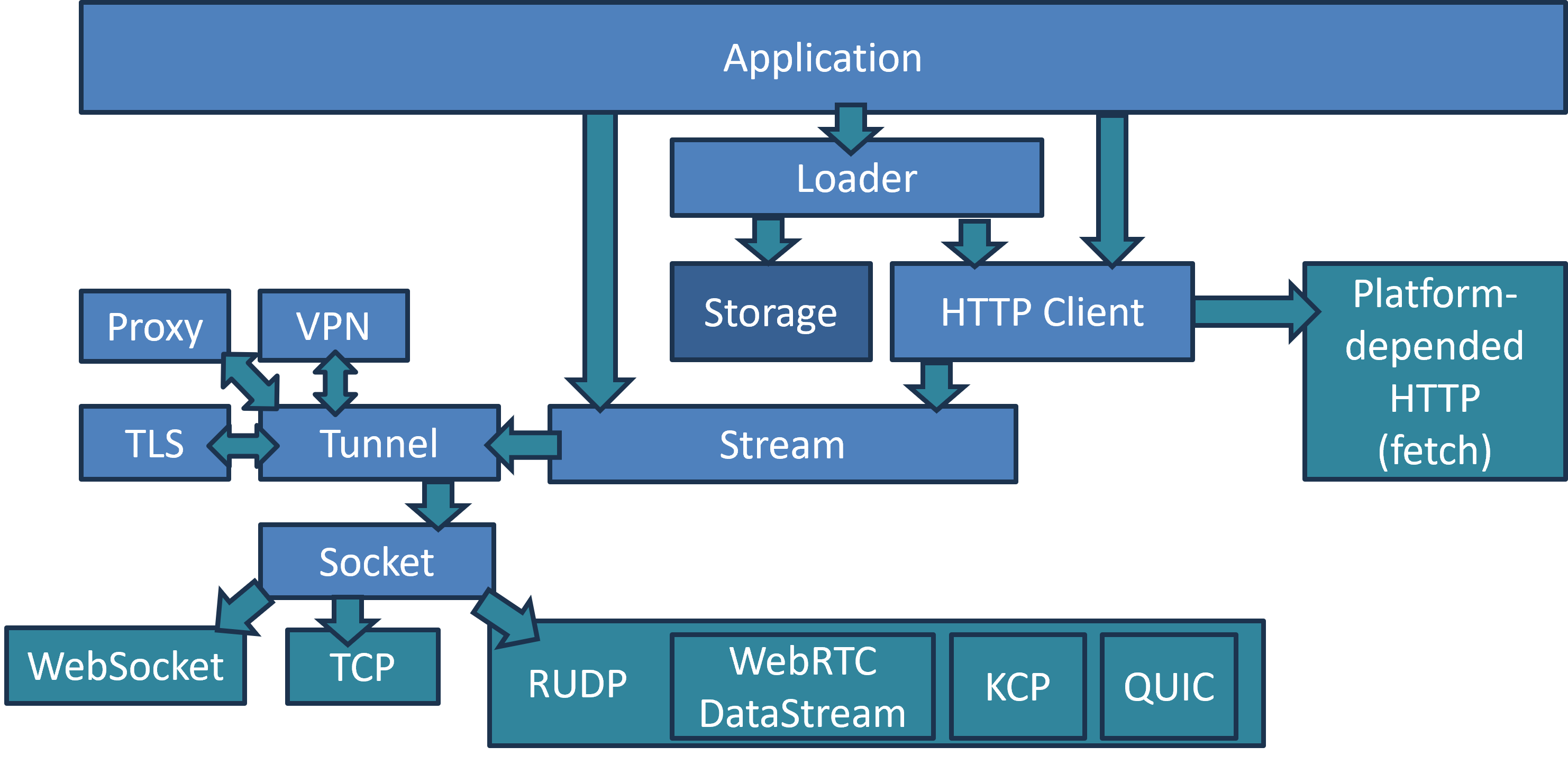
For simple downloads, applications use an asynchronous Loader that accepts a URL and returns the result later. It can combine local caching through Storage with an HTTP client implemented either by platform APIs such as fetch or by the framework itself.
Applications can also work directly with binary streams. Streams can be wrapped in TLS, proxies or tunnels and mapped to different low-level transports: TCP on native platforms, WebSocket on Web, or reliable-UDP solutions such as WebRTC DataChannel, QUIC or KCP when appropriate.
Multimedia
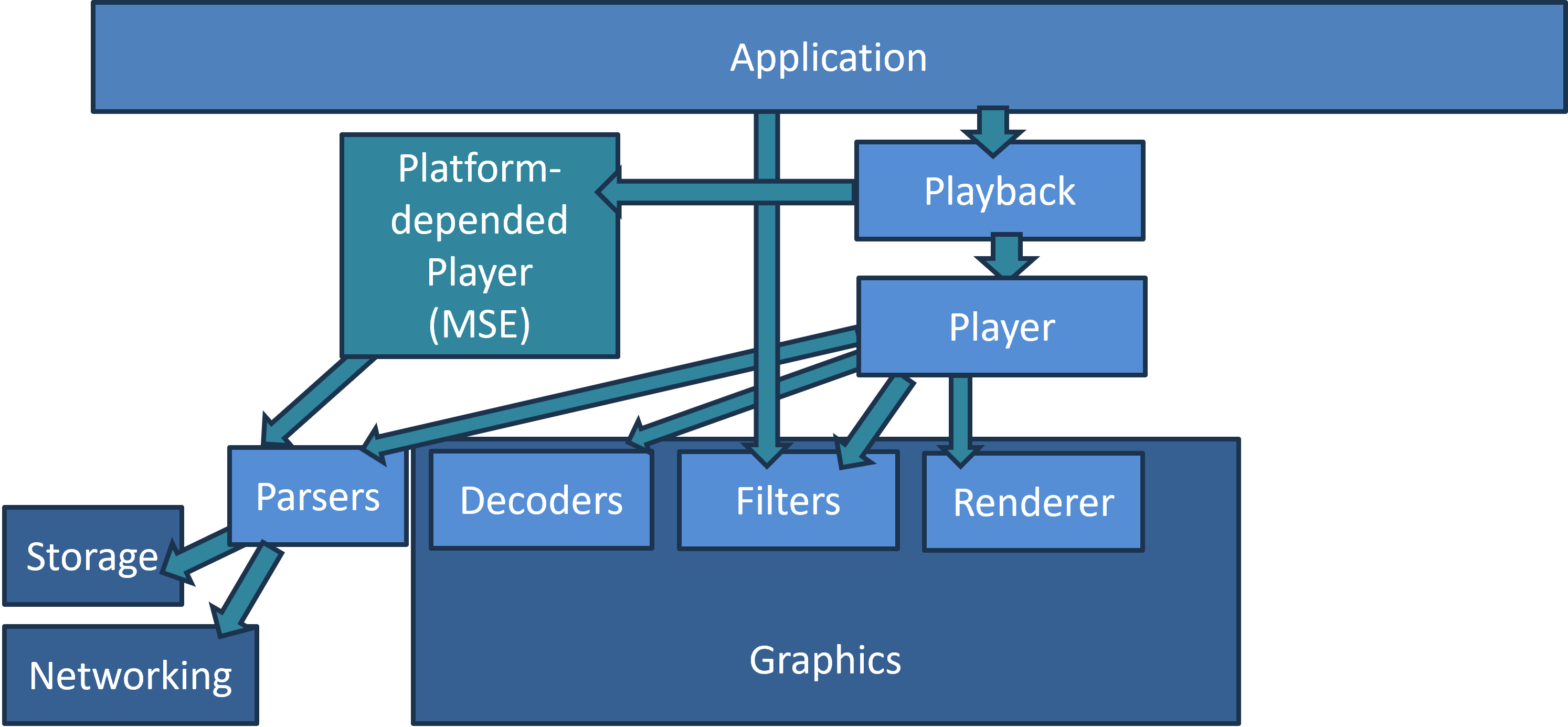
Modern video playback processes too much data to be implemented efficiently on the CPU alone, so access to hardware-accelerated decoding and GPU resources is essential.
On the Web, where the required low-level capabilities are not always available, the framework can fall back to a platform player such as MSE. On native systems and capable browsers, our own playback pipeline can use hardware decoders, optional filters and GPU rendering.
The key rule is that decoded video data should stay inside the GPU whenever possible instead of being copied back through the CPU.
Threading & Synchronization
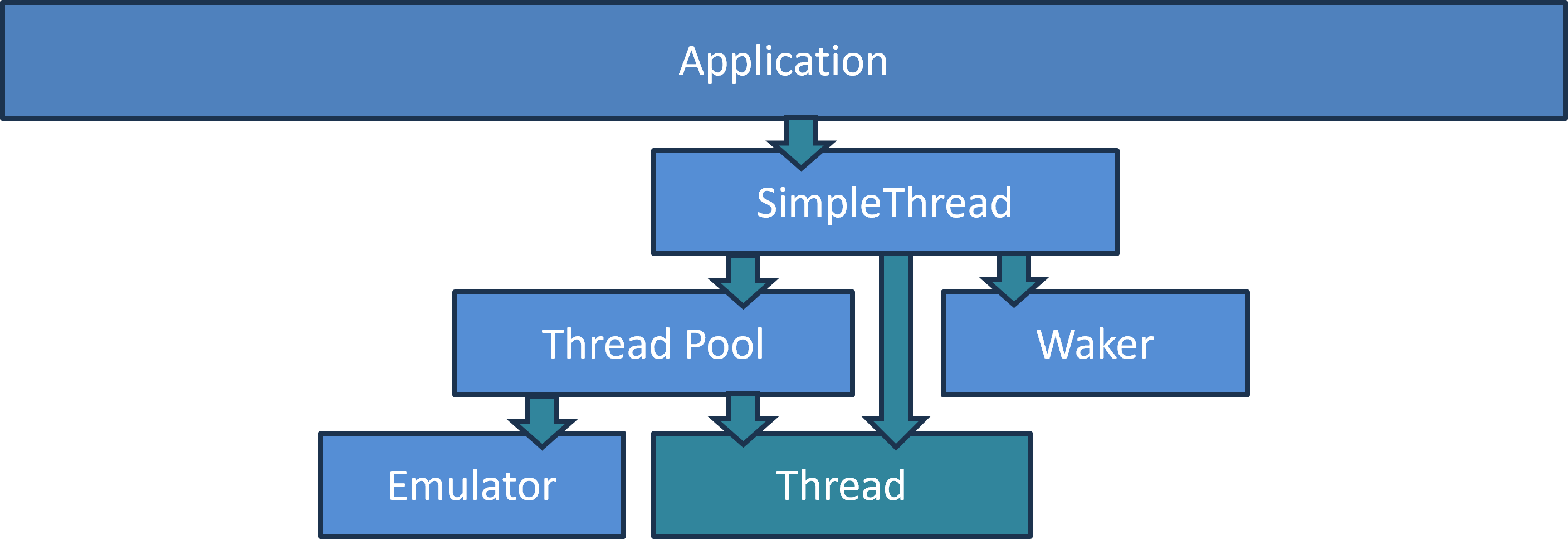
For background work, applications normally use the SimpleThread pattern. Native platforms have a direct implementation, while the platform-independent Thread Pool reuses worker threads and avoids creating more active threads than the CPU can reasonably execute.
To preserve the same programming model on Web, we added a lightweight thread emulator. The next slides explain the restrictions that make this possible.
Our Approach to Asynchrony
Since synchronous APIs are often unavailable on Web, application-facing framework APIs are designed to be asynchronous. Modern C++ lambdas and variadic templates make this much less painful: callbacks can capture local state and be passed around almost as naturally as JavaScript functions.
JavaScript-like C++ Style
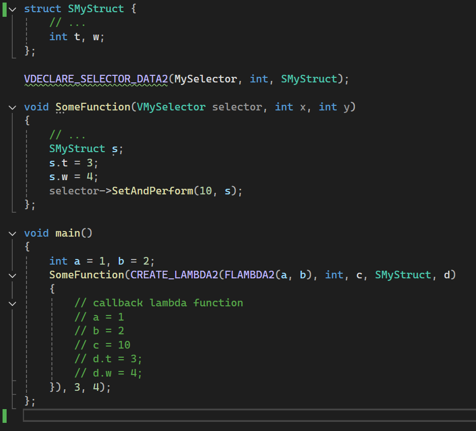
A callback type is represented as a heap object that can be passed through a reference-counted smart pointer. A function may retain it and invoke it later; captured variables remain valid for as long as the callback object exists. The result feels familiar to developers coming from JavaScript while still being ordinary C++.
SimpleThread Pattern

Instead of writing worker threads that execute one long task, we split work into small steps. After each step the handler returns control and indicates whether it should continue immediately, sleep for a while, wait indefinitely or finish. Sleeping work can be woken early by a signal from another thread.
SimpleThread Example
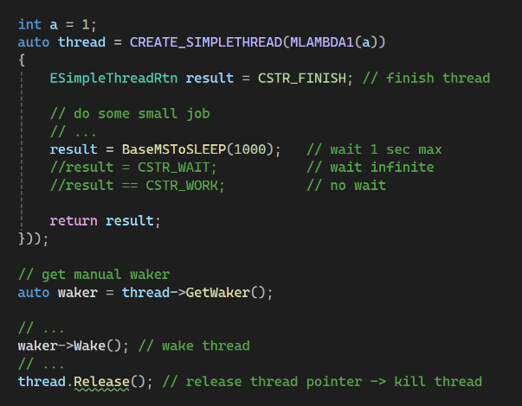
The handler is called from a worker thread and processes only a small quantum of work. Its return value tells the scheduler what to do next. The thread object itself follows the same reference-counted lifetime model as the rest of the framework, so it is automatically destroyed when the last reference disappears.
SimpleThread on Web

To make porting to Web easier, the basic implementation uses one scheduler that executes SimpleThread handlers sequentially. With no simultaneous shared-memory access, critical sections become no-ops and reference counters no longer need atomic operations. The resulting speedup partly compensates for the loss of true multithreading.
Real Multithreading

We still do not want to give up real parallelism completely. StrongThread runs as a normal native thread on desktop and mobile platforms and wraps a real Web Worker in the browser. Instead of shared mutable memory, the framework provides asynchronous message passing, allowing performance-critical pieces to be migrated to true parallel execution one by one.
Why Not SharedArrayBuffer?

SharedArrayBuffer can provide shared memory between workers, but it comes with additional browser security requirements such as cross-origin isolation. It also forces us to bring full synchronization and atomic operations back into the Web implementation, losing some of the performance benefits of the simpler model and making optimization harder for the JavaScript engine.
Deadlocks & Memory Leaks
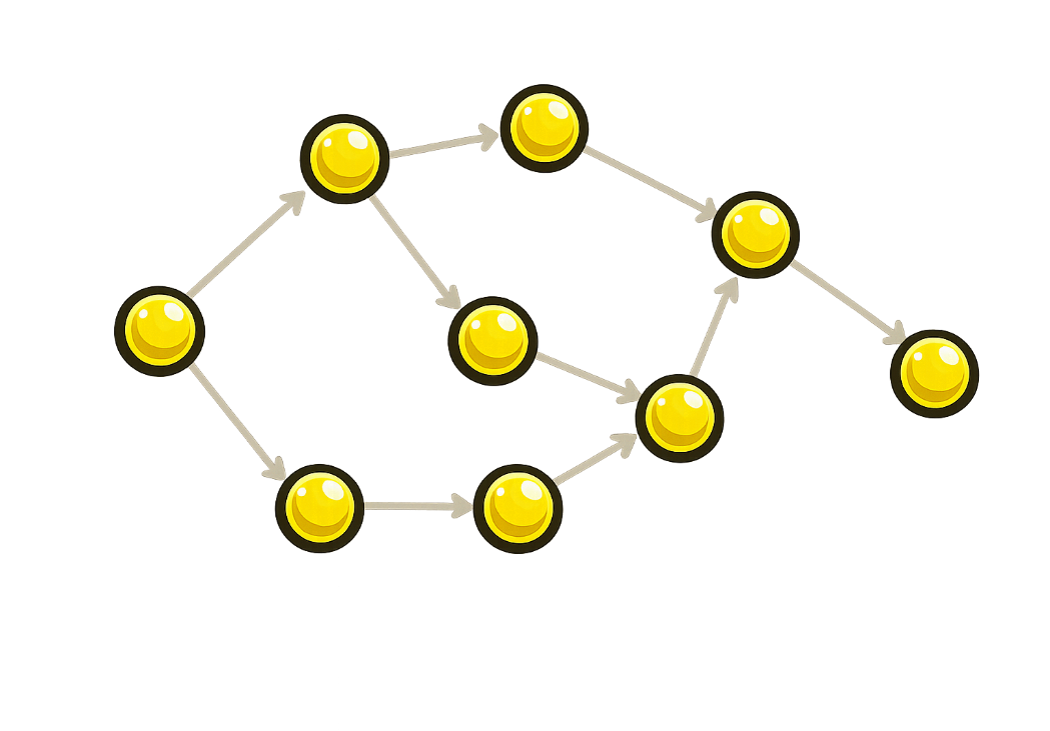
A surprisingly effective rule is to avoid cyclic reference graphs. Communication in the reverse direction is performed through an asynchronous postMessage-like queue; where necessary, reverse links are represented by IDs and maps. This removes the usual circular wait structure behind deadlocks and at the same time prevents reference-counting leaks caused by object cycles.
Conclusions

In the end, we managed to keep one implementation of high-level application logic across native platforms and Web while still retaining access to low-level C/C++ libraries and platform-specific capabilities where they matter.
The same approach covers UI, playback, networking and local storage without forcing every platform into the limitations of the weakest one. Web support can also be introduced gradually: start with the emulated model and move only performance-critical parts to stronger platform-specific mechanisms.
The goal of this talk is not to present the only correct architecture, but to share the practical trade-offs, mistakes and patterns we arrived at while building high-performance applications for both native devices and the Web.