Real-time transcoding and delivery of highly dynamic sports video content for mobile devices and SmartTV
Author: Kim Bondarenko
Form: Presentation
VOD/IPTV quality in OTT

A few words about video quality. When OTT first started emerging back in the 2000s, every provider faced the same major challenge: buffering. In other words, the network could not deliver enough video data by the time playback reached it. Needless to say, this was extremely frustrating for users.
Providers had to choose between image quality and the frequency of buffering. Video compression was still relatively inefficient, and networks themselves were not yet capable enough. As a result, picture quality was poor: DCT artifacts were everywhere, macroblocks were constantly visible, and the image lacked sharpness.
The industry gradually solved the buffering problem by introducing adaptive streaming through HLS and later DASH. These technologies allow the player to automatically switch to pre-encoded streams with lower bitrates or to adjust the bitrate smoothly, much like a continuously variable transmission (CVT) in a car.
Image quality continued to improve alongside advances in network infrastructure and video compression technologies. However, decoding newer codecs such as MPEG-4 ASP (DivX) and H.264 required significant computational power, and for quite some time users experienced performance limitations on many devices.
Eventually, virtually all devices—including tablets and smartphones—became powerful enough to play Full HD video smoothly, and it seemed that the OTT industry had reached a certain level of maturity.
However, if you compare the same live sports broadcast on traditional cable television and on a typical OTT or mobile TV service, you'll notice that, with only a few exceptions, something still feels missing. What is missing is that cable television delivers a picture that simply looks more alive.
Smoothness

This is because, in the second case, we're dealing with 50 frames per second rather than 25. I'll refer to them as 50 and 25 fps throughout the talk, although in reality there are also 60 and 30 fps systems. That distinction isn't particularly important here.
Historically, 25 fps comes from motion picture film. At the time, it was considered sufficient for the human eye to perceive a sequence of still images as continuous motion. Television, however, quickly revealed that 25 fps wasn't enough, so broadcast systems adopted 50 fields—or effectively 50 motion updates—per second. The reason lies in how CRT displays worked. The image was refreshed line by line from top to bottom, and the phosphor began fading immediately after being excited by the electron beam. By the time the scan reached the bottom of the screen, the top had already started to dim. As a result, the screen was always flickering rather than displaying perfectly stable images. Flicker at 25 Hz was highly noticeable and unpleasant, whereas doubling the refresh rate to 50 Hz made television much more comfortable to watch.
Consumer video followed the same approach. VHS camcorders also recorded video at 50 fields per second to remain compatible with 50 Hz analog television standards. Recording only 25 frames per second would actually have been much more complicated, because the playback device would have needed to store each frame and display it twice for a CRT television. Analog electronics simply didn't have an easy way to buffer and store entire video frames.
25 fps vs 50 fps
Here's the same video shown side by side: 25 fps on the left and 50 fps on the right. If your browser can play 50 fps smoothly, the difference in motion smoothness should be immediately noticeable.
Here you can see several different types of content. We start with sports broadcasts and then move on to consumer video. Consumer video has gone through an interesting evolution. Back in the VHS era, people were used to watching video at 50 fps. The first generation of digital camcorders did not have enough processing power to record at that frame rate, so many of them switched to 25 fps. Today, devices have become much more powerful, and we have essentially returned to 50 fps. Modern camcorders and even smartphones—including the latest iPhones—can record video at 50 fps.
The same applies to broadcast television. Besides sports, the difference is especially noticeable on scrolling text. Any content that contains horizontal scrolling graphics or tickers benefits significantly from being displayed at 50 fps.
Finally, we demonstrate a commercial break. The original advertisement was received as a 25 fps stream, and on the backend we converted it into a 50 fps stream.
How to deliver 50 fps in OTT?

So, we have defined the goal: we need to find a way to prepare and deliver 50 fps video to the end user. To smartphones, tablets, PCs, set-top boxes, Smart TVs, and any other devices an OTT provider has to support.
At first glance, this may sound simple: upgrade the whole system, add more processing capacity, and deliver the stream. But in practice, it is not that easy. Existing providers already have a large user base with older devices. And it turns out that on some of them 50 fps video will not play at all, on others it will stutter, and elsewhere other issues may appear. The business simply cannot afford that.
So backward compatibility becomes essential. Users whose service already works today should see no degradation and should have nothing to complain about. At the same time, users whose devices can receive and play 50 fps video should get a smoother and more dynamic picture.
And, of course, we also want to avoid multiplying the budget: we do not want to put another equally large, or even larger, backend system next to the current one, and we want to avoid a several-fold increase in costs.
Problem resolution
So, what options do we have? These are the two approaches we considered.
The first idea is to follow the same path as TV manufacturers. Since they have no control over the backend, they implemented frame-rate doubling algorithms that attempt to convert a 25 fps stream into 50 fps directly on the client device.
The second option is available because we are an OTT provider. That gives us much more flexibility: we can preprocess the video on the backend and, whenever the client device supports it, deliver a stream that has already been prepared at 50 fps.
Development

However, Option A has another major drawback: it is extremely computationally expensive. Performing frame-rate doubling on the CPU is simply not feasible across the entire range of devices that an OTT provider has to support. In practice, the implementation would have to rely on GPU acceleration.
But using the GPU in the OTT world introduces another challenge. We have a huge variety of client devices, GPU architectures, and graphics APIs. Although the industry is gradually converging on Vulkan, the ecosystem remains highly fragmented: Metal, DirectX, OpenGL, OpenCL, and others. Client applications would have to support all of them.
On top of that, playback must remain perfectly smooth. The whole point is to improve video quality, not to introduce new problems. If a device runs out of GPU performance, playback may stutter, audio can drift out of sync, or other playback issues may appear. As a result, every combination of device and GPU has to be thoroughly tested, which significantly increases both development and maintenance costs.
Battery

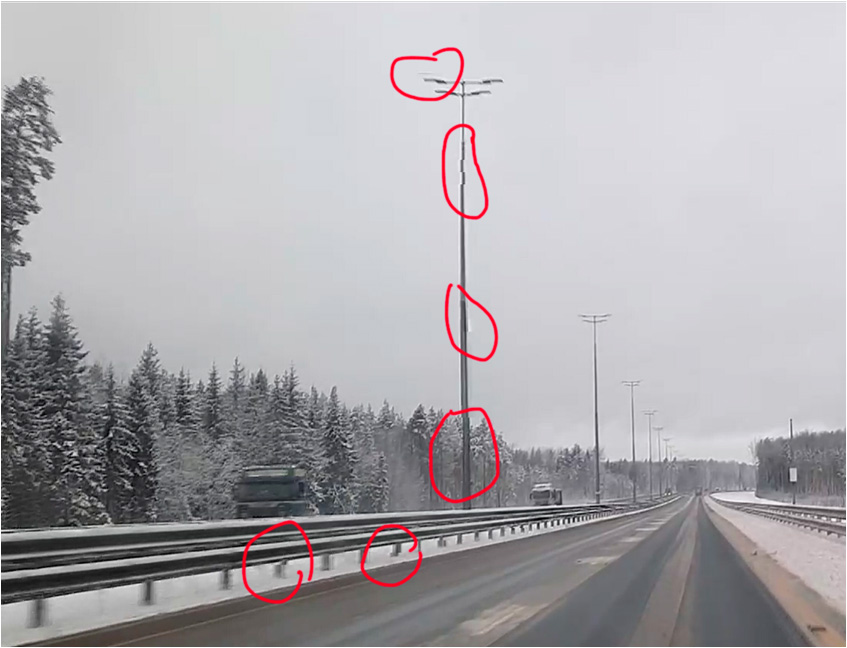
Artefacts
Option B
The first step is to generate a 50 fps master stream on the backend. If the source already provides 50 fps—for example, a professional broadcast feed—we use it directly. Otherwise, when only a 25 fps source is available, the missing frames are reconstructed using frame interpolation. Most importantly, this computation is performed only once for all users instead of being repeated on every client device.
Since not every client device is capable of playing back a 50 fps stream, backward compatibility must be preserved by generating additional renditions through transcoding. In essence, the 50 fps stream becomes an additional layer on top of the existing adaptive bitrate (ABR) ladder.
The final step is to ensure device compatibility by delivering the appropriate rendition to each client. At the same time, lower-bitrate renditions are generated to provide reliable playback under constrained network conditions.
Sources

What kinds of video sources do we encounter in practice? An OTT provider typically ingests content through capture points. These may include DVB broadcast feeds, IP multicast streams received directly from the network, SDI feeds from television studios, and many other source formats.
Within the same channel, a wide variety of content may appear over time: user-generated videos, commercial breaks, archived footage, and many other types of material.
If we look inside such a stream, we find that even a sports channel does not consist entirely of native 50 fps content. The frame rate may change dynamically depending on the source material, often without any explicit indication or metadata describing the transition.
50 fps stream creation
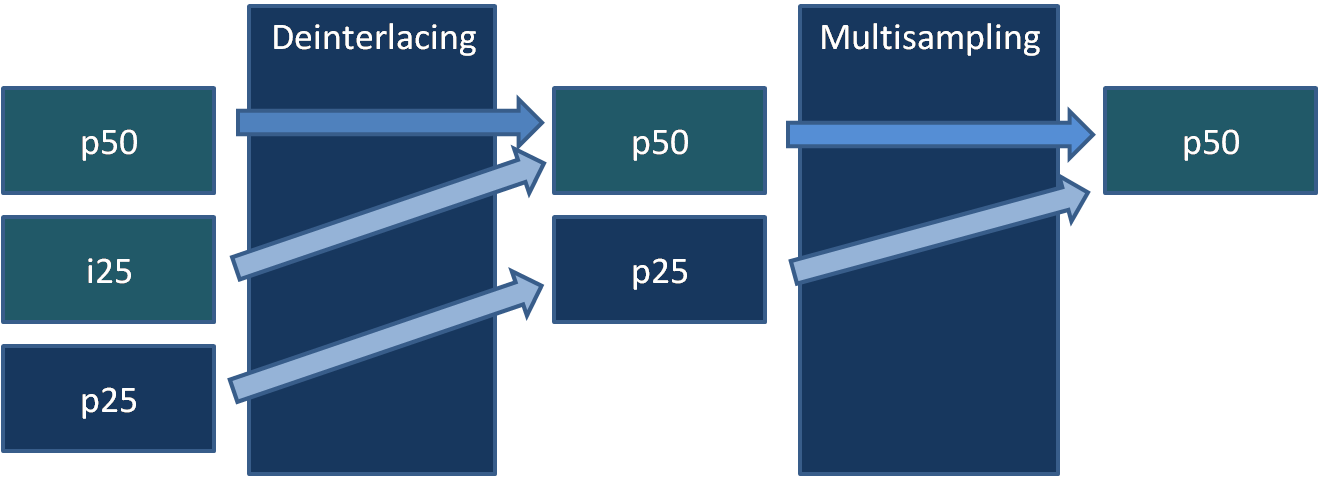
The first task is to generate a 50 fps stream on the backend. Regardless of the input source, the output of this stage should always be a 50 fps stream.
We divide this task into two stages. The first stage is intelligent deinterlacing, and the second is frame-rate doubling.
Many people think of deinterlacing as nothing more than a video processor that removes combing artifacts. In reality, it does much more than that. The deinterlacer first determines the type of the incoming video and, whenever possible, reconstructs a native 50 fps progressive stream. If that is not possible, it produces the highest-quality 25 fps progressive stream free of interlacing artifacts.
The second stage is an intelligent frame-rate interpolation filter. It is used only when a native 50 fps stream cannot be recovered from the source material. Conceptually, it is similar to the motion interpolation algorithms used in modern Smart TVs, but it is computationally expensive. The difference is that all processing is now performed on the backend, where the entire infrastructure is under our control. We can accurately size the required computing resources, choose the hardware platform, and even standardize on a specific GPU vendor if necessary.
Deinterlacing
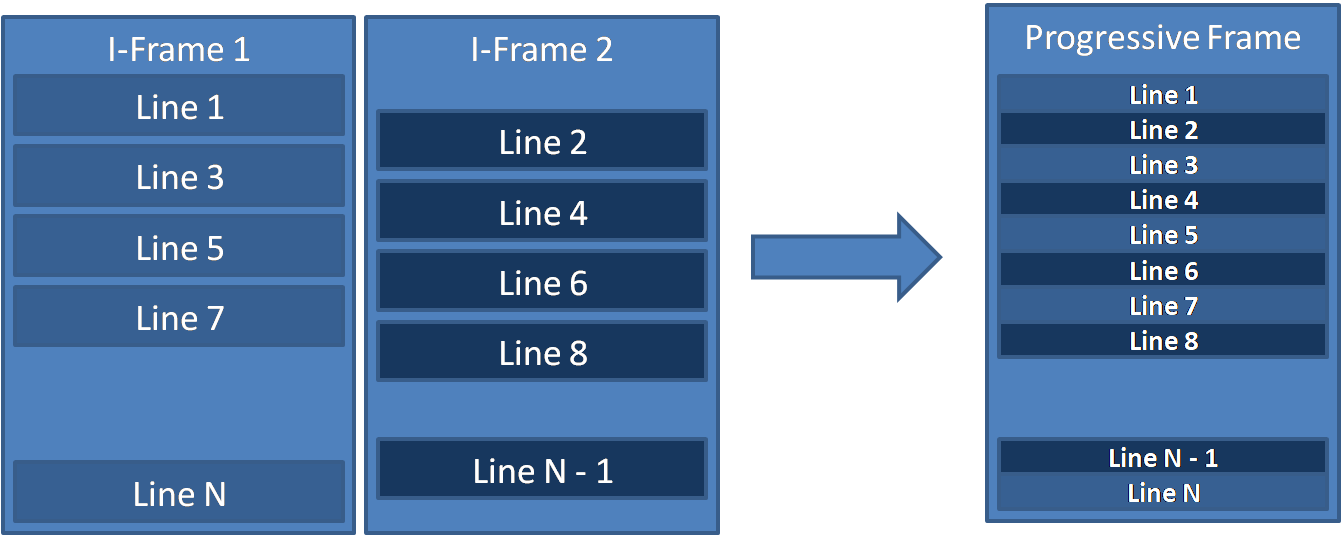
A few words about deinterlacing. Interlacing and deinterlacing date back to the era of analog television. Interlacing is often viewed as an outdated technology that simply introduces combing artifacts which later have to be removed. In reality, it was a clever psychovisual technique that significantly reduced the amount of video data that needed to be transmitted. It effectively solved two problems at once. In fast-moving scenes, viewers perceived motion at 50 updates per second, while in static scenes they effectively received 25 full frames with twice the vertical resolution. This worked almost automatically thanks to the characteristics of CRT displays and the way the human visual system perceives motion and detail.
Interlaced video is conventionally denoted by the lowercase letter i, while progressive video is denoted by the lowercase letter p, standing for interlaced and progressive, respectively.
Streams types
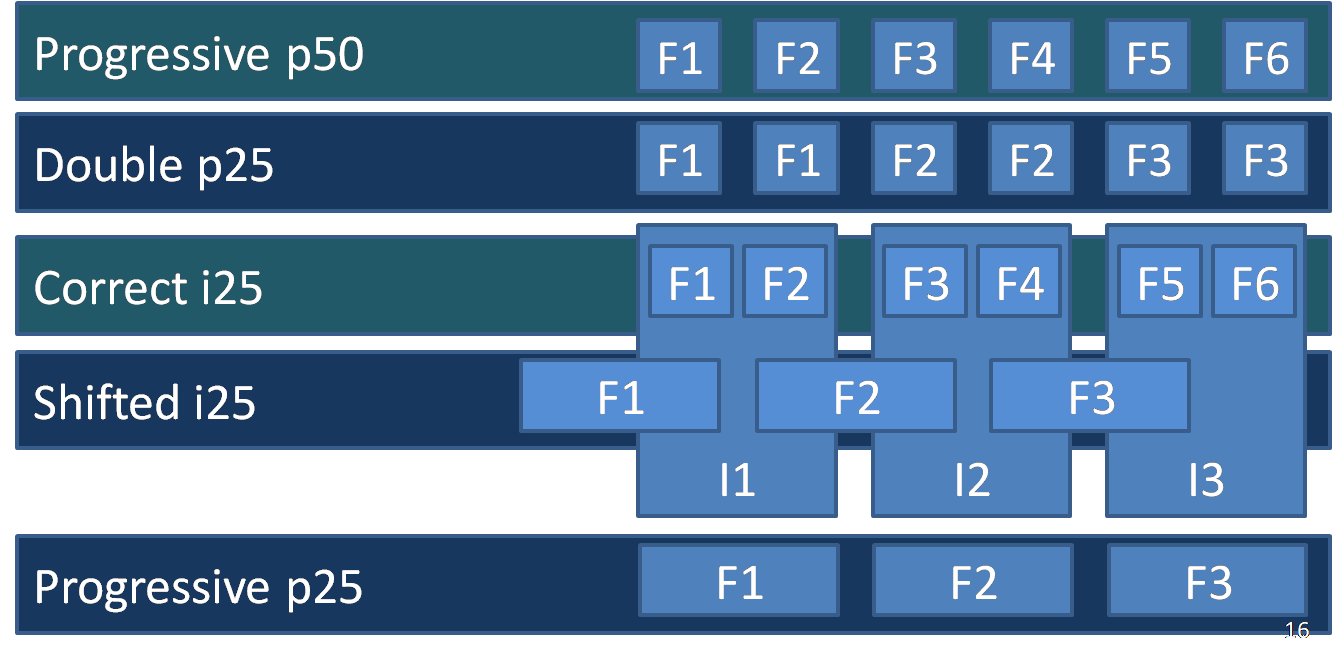
What kinds of streams do we actually encounter in practice? When we started developing this filter, we quickly discovered that the input formats are just as diverse as the devices themselves. After decoding, all we have is the raster image of each frame and its timestamps. Metadata indicating whether the stream is interlaced or progressive cannot be trusted—they are often inconsistent with the actual video content.
Timestamp analysis may indicate a 50 fps stream. However, in many cases this turns out to be nothing more than duplicated frames, where every frame appears twice. The deinterlacing filter must detect this condition and discard every second frame.
We also encounter properly interlaced i25 streams. In that case, the deinterlacer should reconstruct a native 50 fps progressive stream. Proper p25 progressive streams also occur, and those should pass through the filter unchanged.
Finally, there is a particularly interesting case that we call shifted interlacing. At first glance, the stream looks like ordinary interlaced video. However, after reconstructing the progressive stream, it becomes apparent that neighboring frames are duplicated with a half-frame temporal offset. This usually happens because somewhere in the production pipeline a 25 fps source was first converted into 50 fps by duplicating every frame and was later converted back into an interlaced stream with a one-field offset. As a result, each interlaced frame contains fields originating from adjacent source frames. Although this is an unfortunate situation, it can be detected automatically, allowing the original 25 fps progressive stream to be recovered.
Multisampling
Whenever deinterlacing produces only a 25 fps progressive stream, we still convert it to 50 fps.
Why do we do that? First, we want both the CDN and the client devices to operate on a consistent 50 fps stream. Variable frame rates can introduce unnecessary complexity: some players behave unpredictably, transcoders may become unstable, and various stream-processing and delivery pipelines are more difficult to keep reliable.
Second, the visual result is simply better. Even when the source material was originally produced at 25 fps, frame interpolation makes motion appear noticeably smoother.
In sports broadcasting, this is most commonly required for commercial breaks, since advertisements are often delivered at 25 fps. The same situation occurs in news programs and some television shows. More generally, a large portion of non-sports content is still produced at 25 fps, making frame interpolation necessary much more frequently.
Processing options
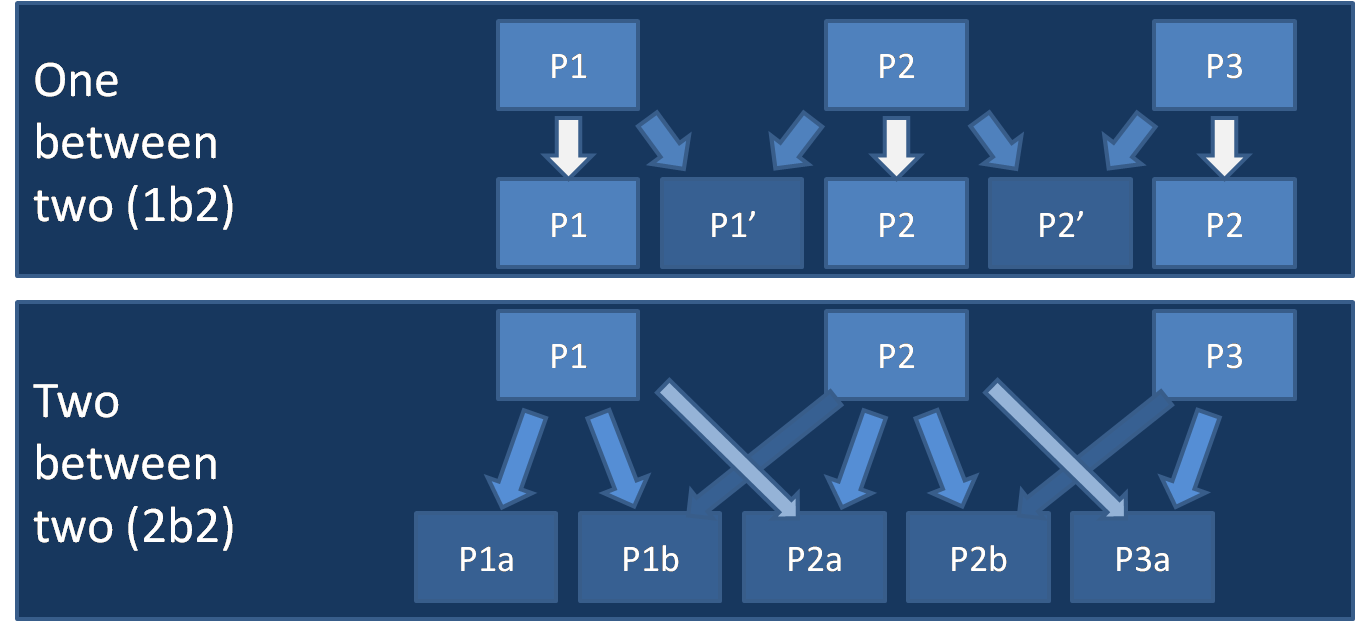
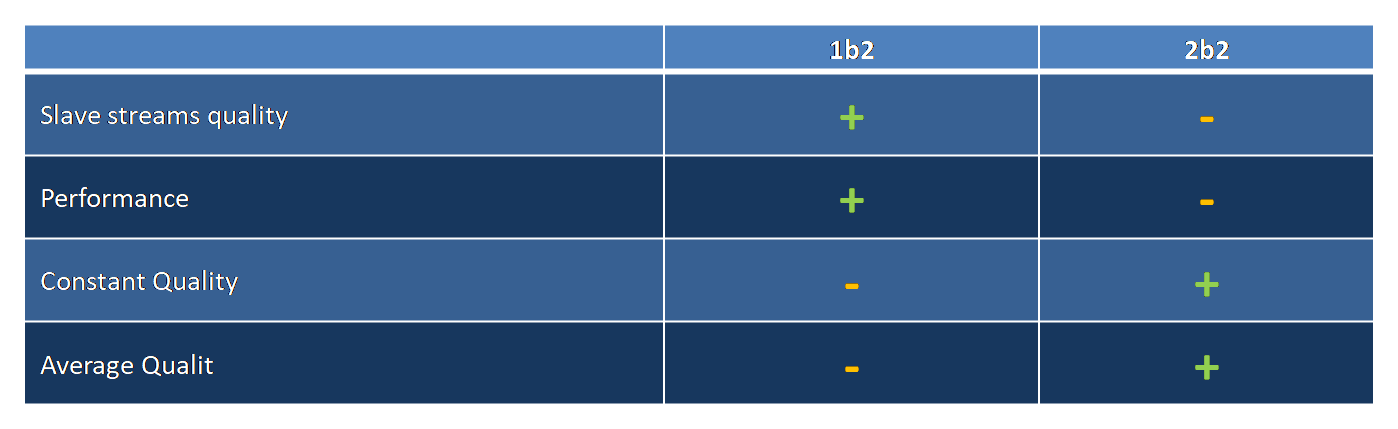
GPGPU Sharing
Since frame interpolation is computationally expensive but is only required occasionally for sports channels (primarily during commercial breaks or other inserts where deinterlacing cannot recover a native 50 fps stream), a simple optimization can be applied:
- The interpolation filter supports two operating modes: a lightweight fallback mode that simply duplicates frames and a full interpolation mode.
- When multiple channels share the same GPU in real time, full interpolation consumes a limited number of GPU processing slots.
- Channels that cannot obtain a processing slot temporarily fall back to frame duplication. As soon as a slot becomes available—for example, when another channel returns to native 50 fps and interpolation is no longer needed—it is immediately reassigned to another channel.
- Channel prioritization can also be applied, giving preference to the most popular or business-critical channels.
With an efficient GPU scheduling strategy, this approach significantly reduces GPU utilization while processing sports and news channels, with little or no impact on the viewing experience.
2-step transcoding
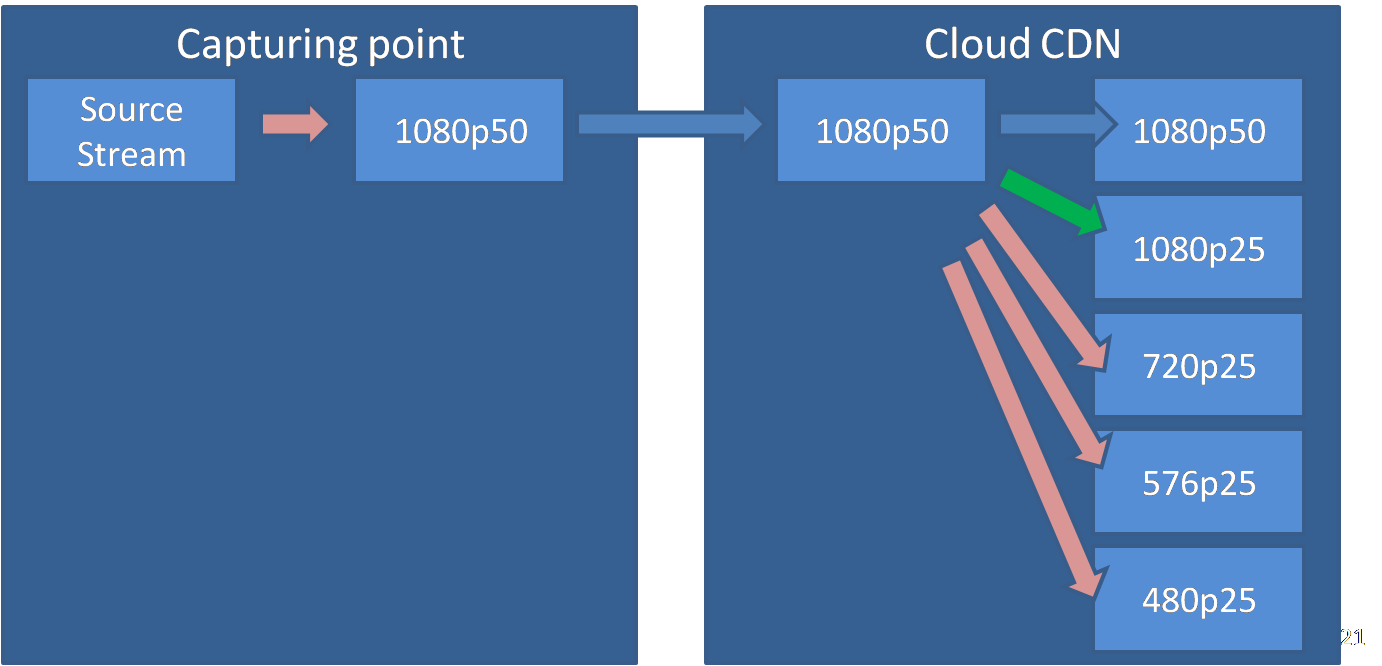
We also want to reduce transcoding costs inside the CDN and minimize the bandwidth required between the ingest point and the CDN. A common solution is a two-stage transcoding pipeline:
- A single high-quality stream is generated at the ingest point.
- That stream is delivered to the CDN, where the remaining ABR renditions are generated.
Now I'll show how we can obtain an additional high-resolution stream almost for free (the green arrow). In our pipeline, the top rendition is a 50 fps stream, followed by a 25 fps rendition at the same spatial resolution but a lower bitrate, with the remaining lower-bitrate renditions generated below it.
The diagram highlights computationally expensive transcoding operations in pink and inexpensive stream copying in blue. When converting from 50 fps to 25 fps without changing the spatial resolution, we can use a neat optimization that avoids a full transcoding pass.
2-d stream building
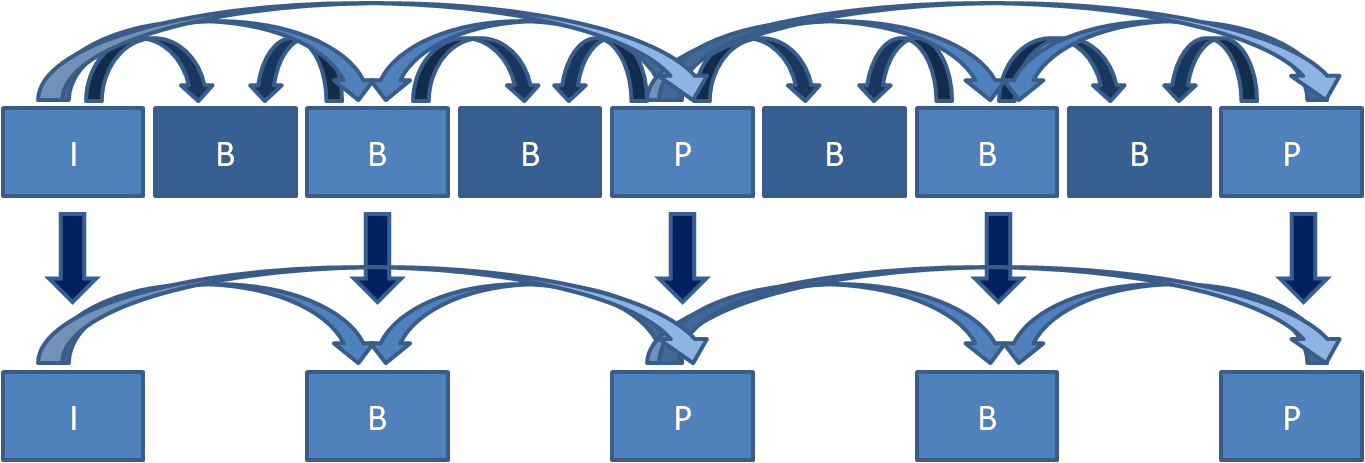
This diagram shows the structure of the original 50 fps progressive stream and the derived 25 fps stream, which is obtained without additional transcoding. Frames are shown in presentation order. In the encoded bitstream, they appear in a different order due to the standard IPB frame reordering.
The idea behind this approach is straightforward. With a carefully constructed B-Pyramid structure, every second B-frame can be marked as non-reference. Those frames can then be removed from the bitstream without introducing decoding artifacts. As a result, the frame rate is reduced by half, while the bitrate decreases by approximately 25–30%, which closely matches the typical spacing between adjacent ABR ladder renditions. The parent 50 fps stream uses an IPBBB structure, while the derived 25 fps stream uses IPB.
This approach significantly reduces the amount of transcoding required inside the CDN when using a two-stage transcoding architecture. Compared to the conventional approach, it saves at least one-third of the transcoding resources by eliminating the need to re-encode the highest-bitrate rendition and the next rendition below it. This architecture is well suited for CDN deployments, allowing secondary ABR renditions to be generated in real time using server CPUs or integrated GPUs. It also reduces the bandwidth required between ingest points and the CDN by approximately a factor of three.
Playback
Once the 50 fps stream has been generated, the next challenge is to play it back on client devices. After all, OTT is a multiscreen platform rather than a single, fixed hardware environment.
The most universal solution is to deliver and play back a progressive stream. This is the direction the industry has been moving toward for years. In fact, modern video coding standards have already dropped interlaced coding several generations ago.
A more sophisticated approach is to convert the stream back from p50 to i25. Less powerful devices could then deinterlace to p25, while more capable devices could reconstruct p50. However, this approach has several drawbacks. Many target devices expose only a high-level media player API and provide no low-level access to the video decoding and rendering pipeline. As a result, correct handling of interlaced video cannot be guaranteed—for example, an i25 stream may simply be treated as progressive 25 fps video. This approach also prevents the use of the "free" derived-stream optimization described earlier. Finally, image quality may be slightly lower because interlaced fields carry less information and are generally less compression-efficient than full progressive frames.
For OTT deployments, we ultimately chose progressive delivery. Nevertheless, the system still supports exporting interlaced streams for specialized deployments with deterministic hardware, where progressive 50 fps delivery may not be desirable for compatibility reasons.
Building compatible video stream
Since no provider wants to lose its existing audience, we must ensure that introducing the new solution does not break compatibility. At the same time, the new p50 stream may not be supported by every client device.
In addition, not every channel justifies the extra computational cost of generating a 50 fps stream. Less popular channels, as well as content that does not benefit significantly from smoother motion—such as movies, cartoons, or comedy shows—should still be processed using the existing pipeline whenever appropriate.
This reminded us of the early days of mobile devices. Back then, many of them struggled even with SD video, and some could not decode H.264 at all, requiring MPEG-4 ASP (DivX) instead. We decided to apply the same idea here.
Compatibility Matrix
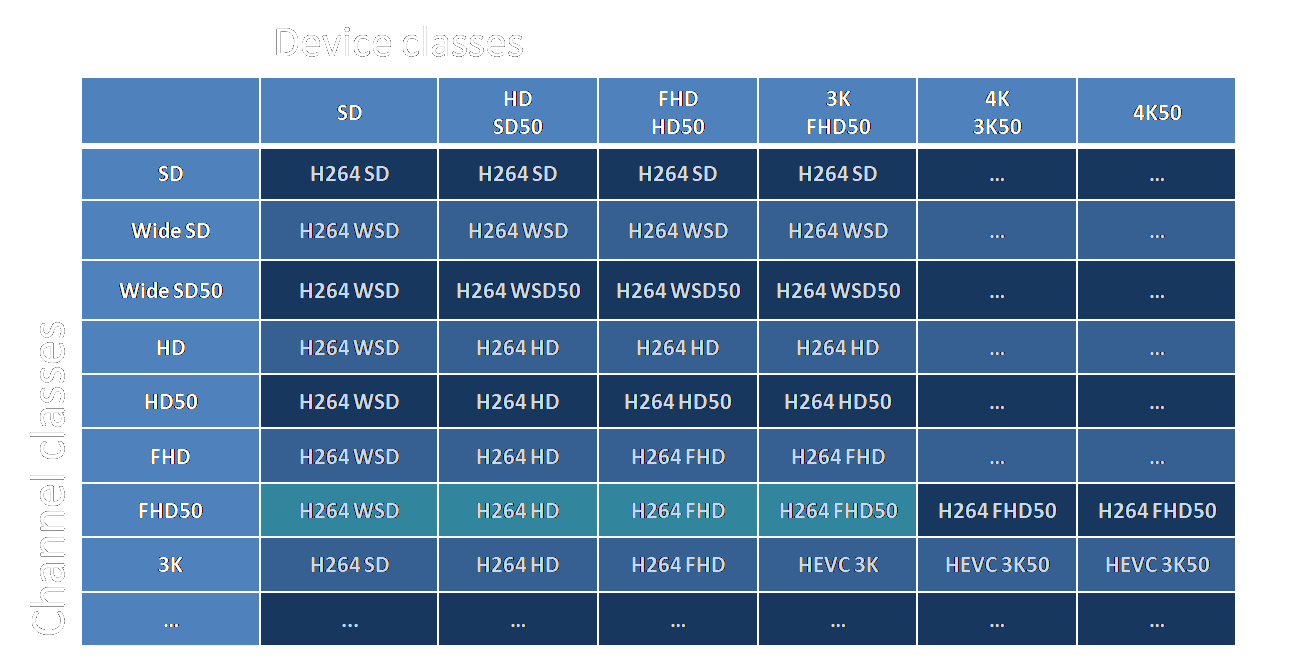
To solve this, we classify client devices by their playback capabilities—for example: SD, HD, FHD, and FHD50. These are represented by the columns in the table. We assume that an HD-class device can also play SD50, while an FHD-class device can play HD50, and so on.
Channels are classified in a similar way according to the highest-quality base rendition they provide: SD, SD50, HD, HD50, FHD, and FHD50. These form the rows of the table.
We then build a compatibility matrix. Notice how the upper-right corner gradually becomes populated with identical sets of renditions. Using this matrix, the backend knows exactly which renditions need to be generated for each channel. The streaming server uses the same matrix to determine which renditions should be exposed to a particular client device. In practice, it simply includes all renditions from the beginning of the row up to the device's compatibility level. For HLS, this is implemented by generating the appropriate playlists.
The matrix naturally scales as new formats such as 3K or 4K are introduced. It also provides a convenient way to combine different codecs—for example, H.264 and HEVC—while preserving the same compatibility model.
Conclusion
To summarize, the proposed approach makes it possible to efficiently support highly dynamic content, including sports broadcasts, news, documentaries, and user-generated video.
At the same time, it:
- preserves the existing audience by using the capabilities of high-performance client devices only where appropriate;
- maintains service quality for users operating under constrained or unstable network conditions;
- reduces power consumption on mobile devices;
- avoids a proportional increase in backend infrastructure and transcoding costs;
- provides a scalable foundation for next-generation content, including 3Kp50 and 4Kp50 using HEVC (and VP9 where applicable), while remaining ready for future codecs such as VVC (H.266) and AV1.